A photo sticker journal app for your visual life log
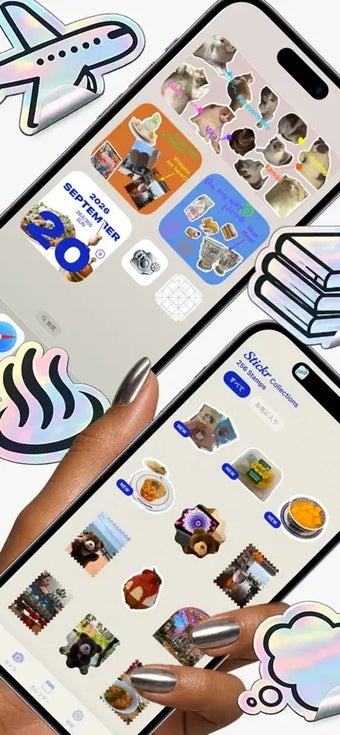
Caplog is a freemium multimedia app that turns your photos into stickers and sorts them into a personal life log. It keeps track of the meals you eat, the places you visit, and the hobbies you keep returning to, all in one visual record.
Similar to photo journaling apps like Collect - Photo Journal, Caplog lets you keep daily moments in one place, with stickers adding a more hands-on way to collect and revisit them. With no account to set up and no ads in the way, it’s easy to start and keep using.
Snap, peel, pin, decorate
Once you open Caplog, the in-app camera does most of the work, since it turns your subject into a die-cut sticker automatically. If you’d rather keep the whole scene, you can save the shot in a rectangular frame instead. Either way, a single swipe peels the sticker off the screen and saves it, and the silent shutter means you can shoot in a cafe or museum without drawing attention.
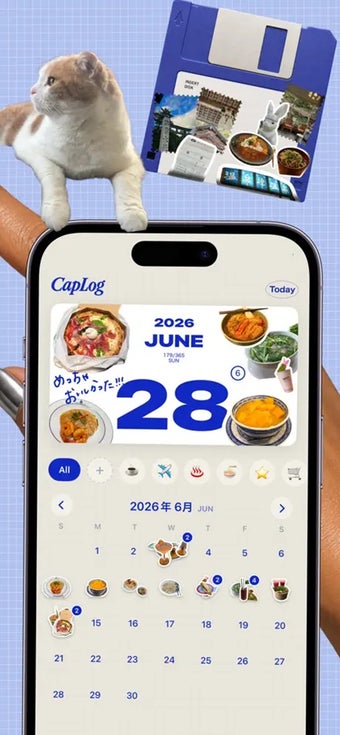
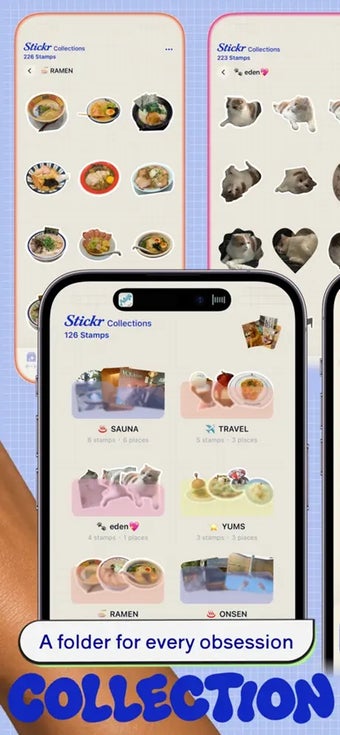
When it comes to organizing, you can build your own categories, like travel or food, and name each sticker. The daily calendar builds on that by letting you decorate each day with stickers, and the screen’s inner frame glows in the color of whichever category you pick. Meanwhile, the map pins your stickers automatically from your photos’ location data, so places fill in without tagging.
Beyond that, you can filter the map by category. The My Map Card fills in Japan prefecture by prefecture with your stickers, ranks the ones you’ve visited, and is ready to share on social media. The art board then lets you decorate a suitcase, phone case, or old CD and save it as an image. The catch is that the map card only covers Japan, and backups run through iCloud.
A handy visual journal
Overall, Caplog - Cap it, Stick it! works best if you like keeping a visual record of everyday moments rather than writing long entries. The sticker camera and the three ways of organizing fit together well, and the lack of an account or ads keeps things simple. Still, the Japan-only map card and the iCloud dependency may limit it for some, so weigh those two points before you settle on it.